Your first time in the Control Panel
Log in for the first time, find your way around the Control Panel and open your first event.
What you will do
In this walkthrough you will log in to the Control Panel, look at the streams that make up your integration, open one event to see what it contains, and find the four areas you will use most. By the end you will know what you can do yourself in the Control Panel and what needs the HC team.
Before you start
You need a Control Panel account. Accounts are created per organisation: ask a colleague with Owner access to add you (see Managing users and permissions), or email support@highcohesion.com.
Have the email address and password from your onboarding to hand, and your phone. Two-factor authentication is enforced, so your first login includes 2FA setup (see Setting up two-factor authentication).
Step 1: Log in
Enter your email address and password.
Follow the two-factor authentication setup when prompted.
You should see the main Control Panel view with your events listed.
Forgotten your password? Click Forgotten Password on the login form and enter your account email. A reset link should arrive within 1 minute; check your spam folder if it does not.
Step 2: Look at your streams
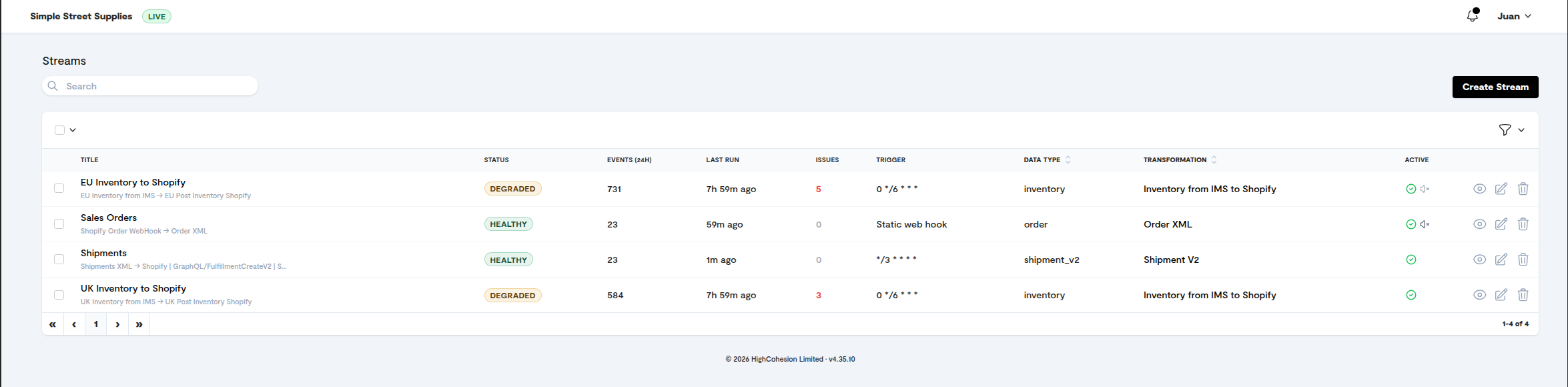
The main view lists your streams: the configured data flows that make up your integration. For each stream you can see:
its name, typically source system, direction and destination, for example "Orders: Shopify → NetSuite"
its current status: active, paused or error
a count of recent events and any failures
Step 3: Open an event
Click a stream name to open its event list. Events are listed most recent first.
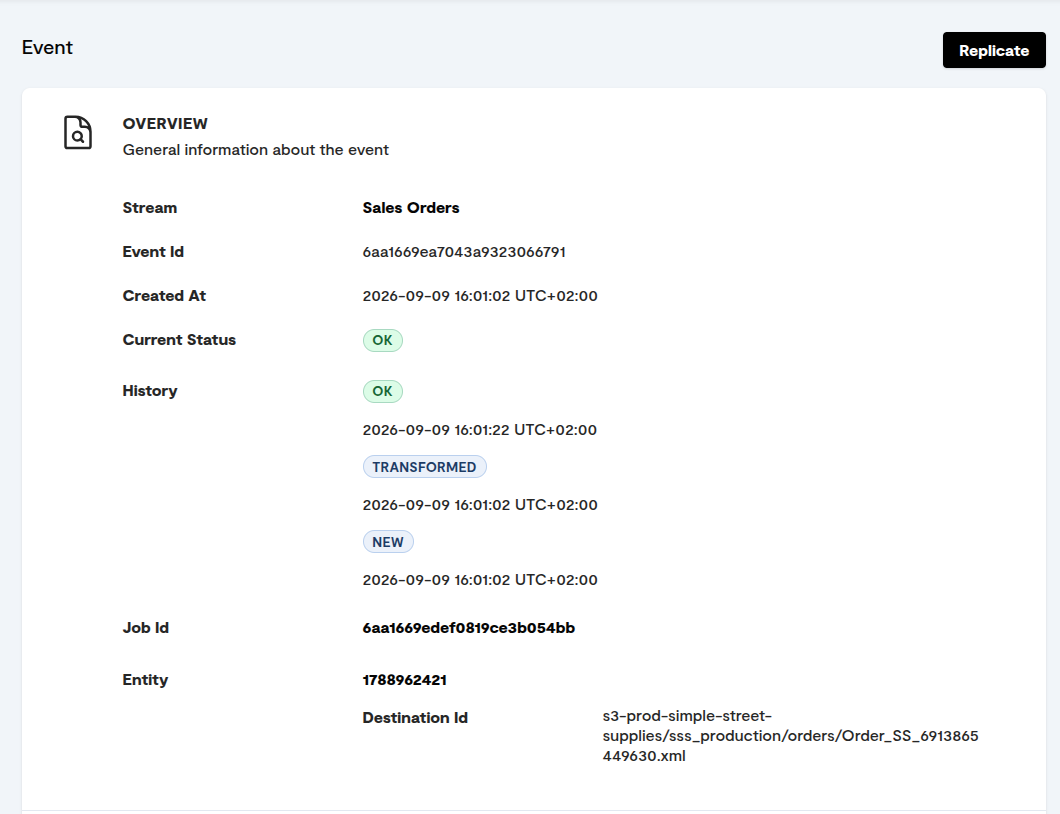
Click an event to open its detail view.
You should see the event's full data payload, its status and any error messages. This detail view is where most investigation happens.
Step 4: Find the other areas
From the navigation menu you can reach:
Streams: your list of configured integrations, and where you check event volume and error counts.
Events: the individual data records passing through each stream, filterable by status, date and reference number.
Issues: the list of open issues to review.
Settings: Users, Alerts and Actions.
What you have done
You have logged in, seen your streams, opened an event and found the four main areas. From the Control Panel you can monitor event processing across all your streams, investigate and diagnose failed events, fix and resubmit individual failed events, set up error alerts, and add or remove team members.
Three things need the HC team rather than the Control Panel: changes to stream logic or field mappings, bulk operations such as resending a large batch of events, and adding or removing integrations. See How to get support.
Where to go next
Reading the dashboard, to understand what each part of the main view shows
Understanding event statuses, to know what each status means and what to do
Setting up error alerts, so you do not need to watch the Control Panel
Was this helpful?
Still need help? Ask the team